Step 1
Copy the server address
Click "Copy" next to the address. You will paste it into ChatGPT in a moment.
Agilix server address (MCP)
https://api.agilix.dog/mcp The same address works in Claude and in ChatGPT.
Part 2
Turn on developer mode, create the Agilix app and pick it in a chat.
Step 1
Click "Copy" next to the address. You will paste it into ChatGPT in a moment.
Agilix server address (MCP)
https://api.agilix.dog/mcp The same address works in Claude and in ChatGPT.
Step 2
Sign in at chatgpt.com in your browser. Open "Settings", then "Apps".
In "Advanced settings", switch on "Developer mode". Agilix is not in ChatGPT's app directory yet, so this step is needed.
Apps
Advanced settings
Developer mode
Step 3
Create a new app. Type Agilix as its name and paste the copied address into the MCP server URL field.
Choose OAuth as authentication. Save the app.
Step 4
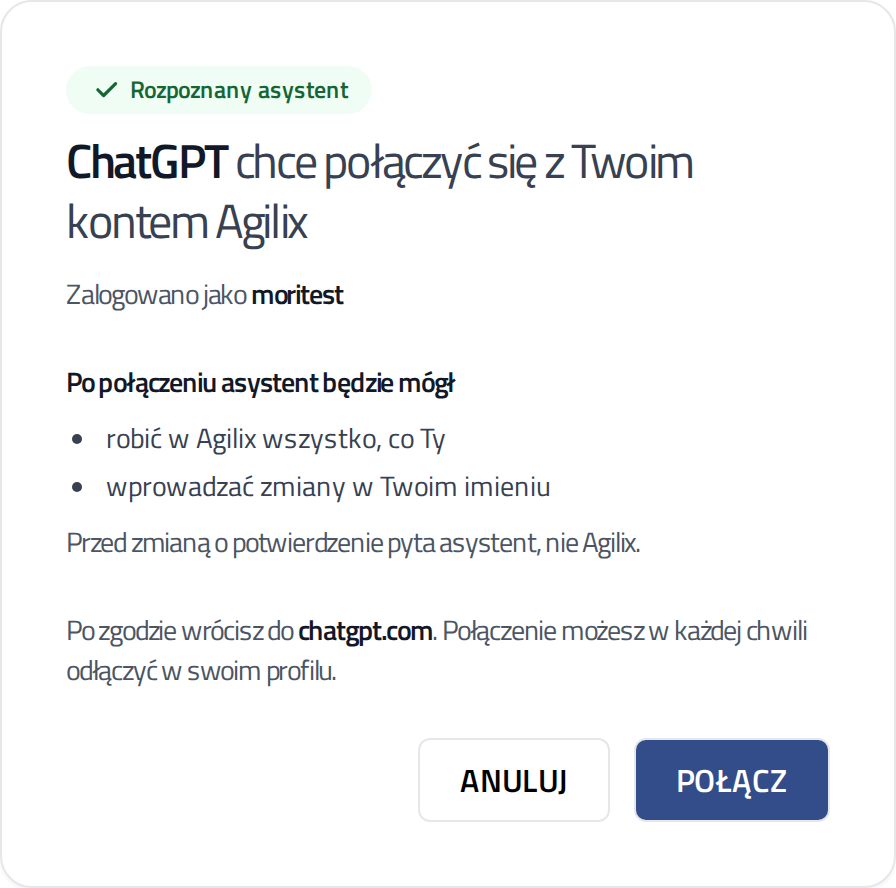
ChatGPT opens an Agilix page. Sign in if asked.
Check that the page recognised ChatGPT. Click "Connect" ("Połącz"). You return to ChatGPT and the app is ready.
Step 5
In a new chat, click "+" below the message box. Open "Developer mode" and tick Agilix.
Developer mode
Agilix
Step 6
Write normally, for example: "What's on at my club this week?".
Before a change in Agilix, ChatGPT asks you to confirm. Check the summary and click "Confirm".
Move Thursday's beginners class to 7 pm.
Agilix · update_class
Developer mode is available on paid ChatGPT plans. It works in the browser, at chatgpt.com. OpenAI may change these rules.
On Business and Enterprise plans, the workspace admin turns developer mode on. If you don't see the option, ask your admin.
Help
Tell us which step stopped you. We will help you finish connecting.